Nursing license lookup: how to verify any nurse's license
Look up any US nurse's license free on Nursys QuickConfirm, which covers 58 boards of nursing, or on the board's own lookup tool.

Short answer: To check a US nurse's license, search Nursys QuickConfirm at nursys.com, a free tool from the National Council of State Boards of Nursing (NCSBN) that covers 58 boards of nursing, or use the lookup on that state board's own website. Both show the license type, status, expiration date, compact status and any board discipline, and both come straight from the board's records.
Where to look: Nursys or the board's own tool
Nursys is NCSBN's national database of nurse licenses and discipline. NCSBN calls it "the only national nurse licensure and disciplinary database", and the data is sent in by the boards themselves.
Nursys has three public services:
| Service | What it does | Cost |
|---|---|---|
| QuickConfirm | Look up a license and download a report | Free |
| e-Notify | Email updates on license status and expiration, for nurses and employers | Free |
| Verification for Endorsement | Sends your license record to a new state when you apply there | US$30 |
Today the QuickConfirm list shows 58 boards, and every one of them shares RN and practical nurse (PN) license data. The number is higher than the number of states because California, Louisiana and West Virginia each have one board for registered nurses and another for practical or vocational nurses.
Every state board also has its own lookup. Some boards run it on NCSBN's platform, like Texas (see Texas BON license verification). Others use their own system, like the California Board of Registered Nursing (BreEZe) or the New York State Education Department. Either source is fine for a quick check.
Advanced practice (APRN) and temporary licenses are a gap. Nursys says only some boards send APRN data, and temporary licenses come from "a limited number" of boards. For those, use the board's own lookup.
Step by step: how to verify a license
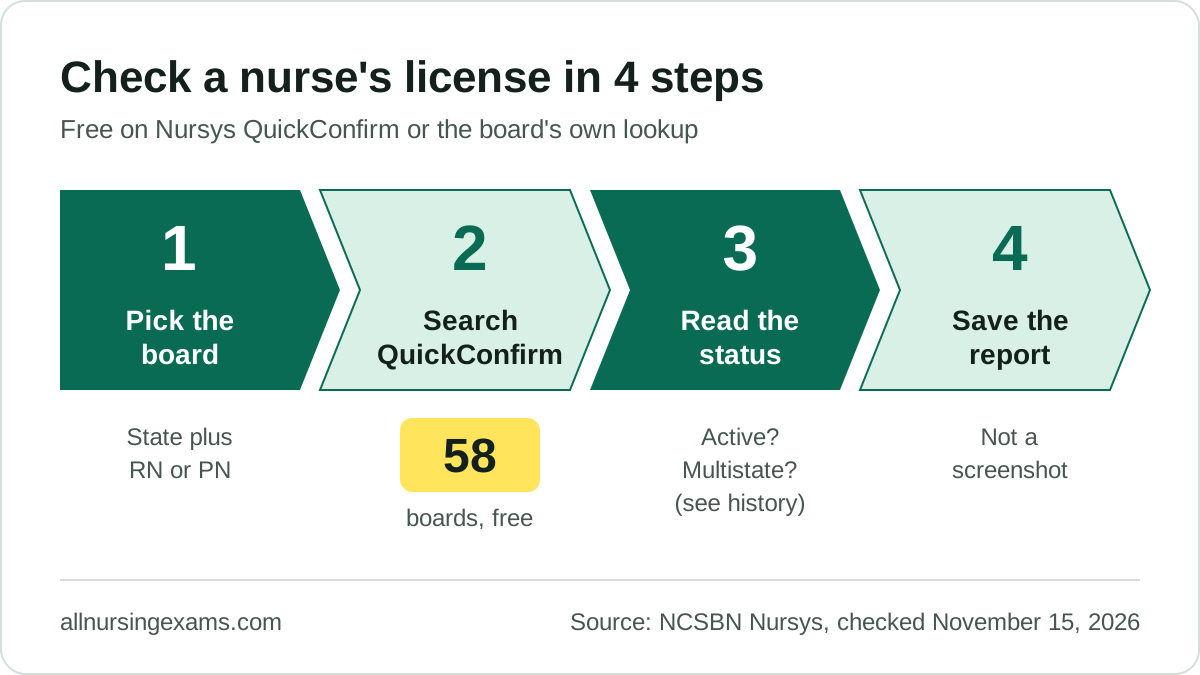
- Find the right board. Ask the nurse which state issued the license and the license type (RN or PN). If the nurse has a multistate license, it is issued by the home state.
- Search QuickConfirm. Go to nursys.com and choose QuickConfirm. Search by license number, or by name and state. The NCSBN ID, a unique number every nurse gets at first licensure, gives the most exact match.
- Read the result. Check the name, license type, "Is License Active", expiration date and compact status. Look for "(see history)".
- Keep the report. Download the QuickConfirm report. Nursys also shows the date of each board's last data upload, so you know how fresh the record is.
- If you find nothing, check the spelling and try the board's own lookup. A nurse licensed in the last few days may not be in Nursys yet, and licenses that expired before 1985 may be missing.
What the status words mean
- Active: the license is current and the nurse may practice in that state.
- Inactive or expired: the license is not current. Each board uses its own words. Texas, for example, shows an expired license as "delinquent" and says this alone is not discipline.
- Unencumbered: Nursys defines this as "a full and unrestricted license to practice". A license with board action against it is not unencumbered.
- (see history): the license has, or had, discipline or another board notice. Open the history to read the board action.
- Single state: valid only in the state that issued it.
- Multistate: valid in every Nurse Licensure Compact state unless restricted. See Compact nursing states: the 2026 list.
Why a screenshot is not proof
A picture of a license card or a lookup page can be old or edited. Boards designate Nursys as a "primary source equivalent" by written agreement, which means an employer can rely on it as if the board itself answered. So employers check the live record themselves, on Nursys or the board's site, on the day they need it. Many also enroll staff in Nursys e-Notify, which NCSBN offers to employers for no charge, so they hear about any status change.
Texas makes this a duty: its rules require supervisors to verify the current license of nurses they are responsible for.
What to do next
- Bookmark the official QuickConfirm page at nursys.com, not a third-party lookup site.
- If you are a nurse, look up your own record once a year and check that your name and expiration date are right.
- If your own record is wrong, contact the board that issued the license. Nursys cannot change board data.
- If you need to send your license to a new state, read RN license verification: Nursys or the board's lookup?.
Common questions
Is the Nursys lookup really free?
Yes. NCSBN says QuickConfirm is "free of charge to employers and the public". Only Verification for Endorsement has a fee.
Can I look up a UK nurse on Nursys?
No. Nursys holds US board records only. For the United Kingdom, use the Nursing and Midwifery Council register: see How to check the NMC register in the UK.
Is Alabama data on Nursys current today?
Not fully. On November 15, 2026, Nursys showed a notice that Alabama's data "is not current" because of problems with the board's licensing system. Check the Alabama Board of Nursing directly until the notice is gone.
Someone called saying my license will be suspended. Is that NCSBN?
No. NCSBN warns of scam calls and says it "will never call a nurse" asking for personal information. Check your status yourself on QuickConfirm or call your board.
Sources
- NCSBN, Nursys home page: https://www.nursys.com/ (checked November 15, 2026)
- NCSBN, Nursys QuickConfirm participating boards: https://www.nursys.com/LQC/LQCJurisdictions.aspx (checked November 15, 2026)
- NCSBN, Nursys QuickConfirm FAQs: https://www.nursys.com/Help/FAQ.aspx?KEY=LQC (checked November 15, 2026)
- NCSBN, Nursys e-Notify FAQs: https://www.nursys.com/Help/FAQ.aspx (checked November 15, 2026)
- NCSBN, Nursys glossary: https://www.nursys.com/Help/Glossary.aspx (checked November 15, 2026)
- NCSBN, Nursys disclaimers: https://www.nursys.com/Disclaimer.aspx (checked November 15, 2026)
- Texas Board of Nursing, Licensure FAQs: https://www.bon.texas.gov/faq_licensure.asp.html (checked November 15, 2026)
- Texas Board of Nursing, Licensure renewal information: https://www.bon.texas.gov/licensure_renewal.asp.html (checked November 15, 2026)
- NCSBN, Nurse Licensure Compact FAQs: https://www.nursecompact.com/FAQs.page (checked November 15, 2026)